MIDI Controllers
MIDI Controllers are simply an way to input MIDI data into your Digital Audio Workstation.
Some have a USB output that can connect directly to the USB port on your computer.
This is the easiest way to get MIDI into your recording life, but may be only offered on newer hardware.
In general, any Synthesizer can be used as a MIDI controller.
You'll notice that they often resemble a keyboard (although they are often much smaller with fewer keys).
This hardware simply controls inputs to record and trigger digital events.
In the case of a digital piano, the keys are the input that are used by the musician to define the sequence data.
This includes pitch, dynamics, duration, pedal, etc.
A controller is then identical to a digital piano keyboard in that way, but it also serves as a way to trigger saved events.
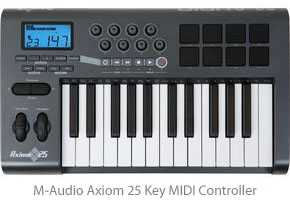
For example you could use the controller to trigger a drum sequence at the correct time rather than reaching over to press "play" or playback the track through your software interface.
In this instance you can think of the controller as an extension of your computer keyboard.
This can be useful in your home studio since it's generally a pain to get to your computer keyboard without entangling yourself in cables and cords.
Unlike a full synthesizer or digital piano, these do not have sound samples included on board.
Instead they usually come bundled with a software package that includes a sequencer with Softsynth samples.
Once again, keep in mind that these do not make sound on their own and have no line level outputs to record.
Instead they simply trigger software based samples from your DAW, so if you haven't set this up then you can expect to hear nothing when you press a key on your MIDI controller.
These are a great alternative to a full synth setup... especially for those without a background in piano (I thought everyone's Mom made them take lessons when they were young).
Often they have much fewer keys, maybe two octaves, and are convenient to store in tight places... so they can be a valuable part to your setup even if piano isn't your thing.


