Headphone Amps
Headphone Amps are designed specifically to drive the signal to your headphones instead of a studio monitor or other loudspeaker.
This feature is also offered on nearly every mixer and audio interface, but the drawback with those is that they can under-drive your headphones.
You'll want a good, high output signal to your headphones so that you don't end up boosting the gain and other levels to compensate.
In other words, you need to hear the signal loud enough so that you're not inclined to introduce noise into your recording with improper input settings.
Remember that setting your input level is really independent of how "loud" you hear the signal.
All that really matters is how "loud" the microphone preamps and eventually the recording software hears the signal.
Also there is often only 1 output for an included headphone amp which does't allow you to have another musician monitoring their playing at the same time.
If you are a solo act then you can probably get away without a dedicated amp, but for the rest of us.... read on.
Distribution vs. Sub-Mixing
So if you have decided to add this to your system, the next question is do you want a Distribution or Sub-Mixing amp?
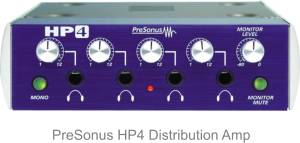
Distribution Amp - You can think of this as a type of splitter.
It takes 1 input signal and divides it out into multiple outputs that can each be heard through a set of headphones.
Typically each output will have it's own volume control, but everyone will hear the same thing.
Sub-Mixing - Unlike the distribution amp, this one takes multiple inputs and sends them to multiple outputs.
Now at first that might not sound like a big deal, but this can make a really big difference when recording tracks with multiple musicians.
Imagine you are recording with 1 other person. You are on piano and vocals while they are on guitar.
With a sub-mixing amp you can assign the output of your Audio Interface to a specific musician.
So if the lead singer wants to hear more of his own voice (as is typically the case with lead singers) you can adjust the levels for just that person.

Now each musician can hear the mix they want and each can give their best performance.
These are slightly more expensive and you have to decide if the ability to assign custom mixes to each output is something you want to pay for.
This can be particularly useful when using your headphones to set up a Monitoring Mix during tracking.


