Control Surfaces
Control Surfaces may be considered a luxury for the thrifty Home Studio creators arsenal...
But they may be a luxury that you decide to take advantage of.
Also there are some alternatives that offer a slightly reduced function set for a greatly reduced price.
But first things first...
What are these things used for?
That sure looks like a Mixing Console to me.
Although you would be right to say that these resemble mixing consoles in their look, the application is much different.
Instead of an input into your signal chain (like a Mixer), these are used to command the software based mixers that are part of your Digital Audio Workstation's recording software package.
So although you could get by with using your mouse and clicking the on-screen faders and knobs, this gives you a direct, physical interface you can use to control your software.
In the same way that a MIDI keyboard is not a real piano, the audio Control Surface is not a real Mixer.
Rather, it controls the software mixer present on your computer via MIDI commands the same way that MIDI commands trigger piano samples in a synthesizer.
Another important difference between these and a mixer is the lack of preamps.
These do not have inputs for mics, instruments, etc like Mixing Consoles and Audio Interfaces
Furthermore, the commanding is done via MIDI (either dedicated MIDI or USB MIDI connection) so that the unit is only handling digital data at any time.
There is no conversion, no amplification, just an alternative way to interact with your software.
That being said, these little guys have a sweetness-tech-factor of 11 on a scale of 1 to 10.
Being able to physically adjust your levels, panning, and other parameters is a very cool thing.
If you can find one used and can justify it in your budget I'd recommend picking one up.
You certainly don't need it to operate and a new one would eat up a significant chunk of change, but for me it's just a much easier way to work and a very useful tool to have around.
Single Channel Controllers
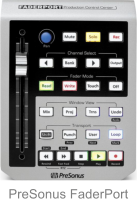
Now if you decide you'd like to have a physical controller to use but don't have the dough needed to buy a full 8 channel mackie, there is a more affordable option.
Many companies are starting to offer single channel options that are much much easier to afford.
Everything works the same, but instead of having all channels available at once you toggle through them and use the mechanical controls for only the active channel.
This is a great alternative that doesn't blow up your budget but still gives you the added functionality.
And as a side bonus to being more affordable - they actually take up far less space on your desk.
Definitely a "nice-to-have" vs. a "must-have" for the Home Recording enthusiast on a tight budget, but a very cool gadget for those of us who just can't resist.


